What a shadow AI report actually shows you
A real Connor scan of an 86-person company found 402 MCP servers and 273 skills. Here is how to read the report — the egress surface, the risk, the sprawl.
We ran a Connor scan across an 86-person company and pulled the report. Four AI clients in use — Claude, Cursor, VS Code, one more. Underneath them: 402 MCP servers and 273 installed skills. Nobody in the company could have told you those numbers before the scan, and that is exactly the point. Shadow AI is not a feeling; it is an inventory you do not have yet.
Here is what the report looks like, and how to read each part of it.
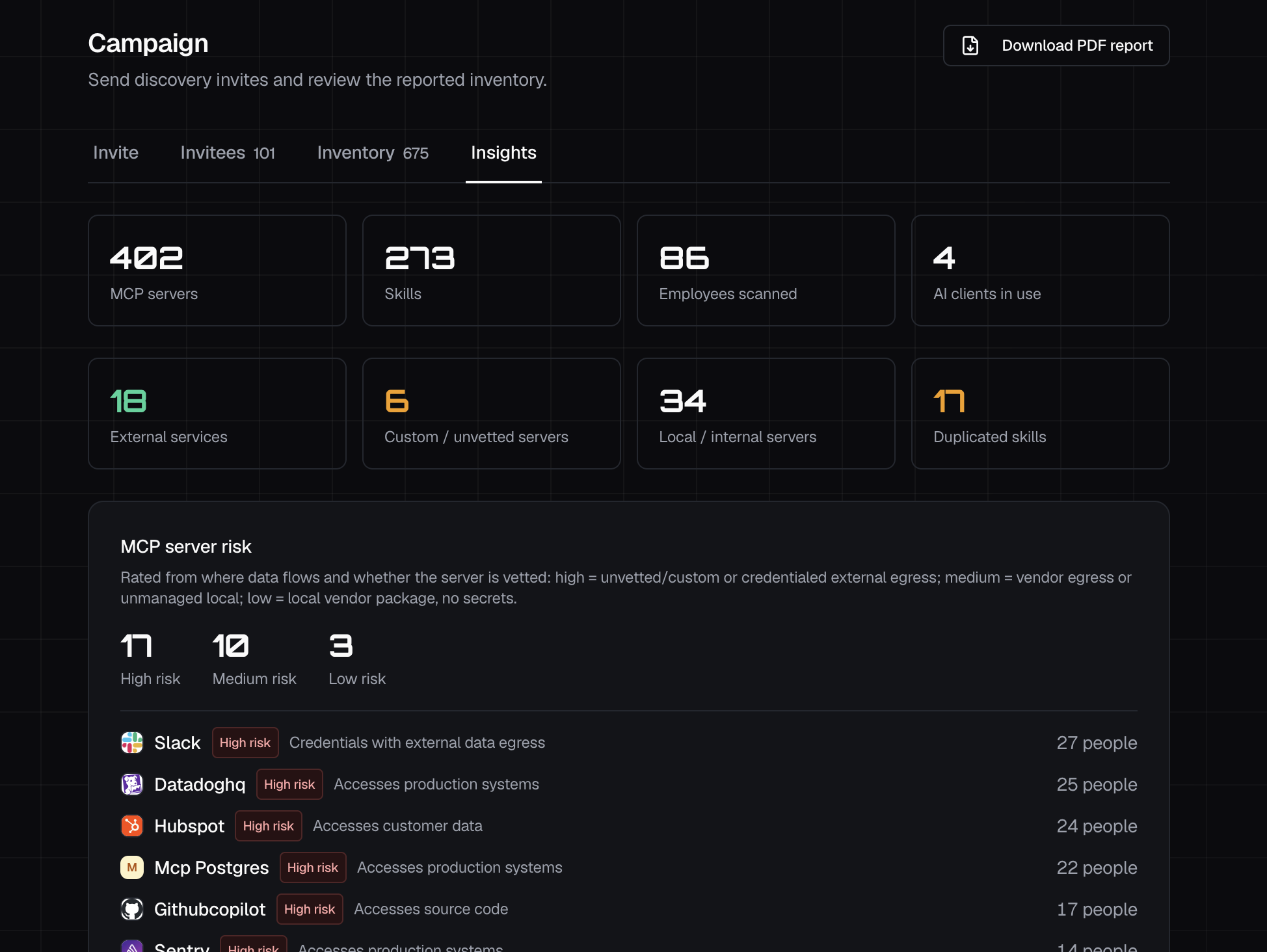
The executive summary: your footprint in six numbers
The top of the report is the at-a-glance footprint: people scanned, AI clients in use, and the totals for MCP servers and skills. For this team it was 86 people, 4 clients, 402 servers, 273 skills.
Then it splits the servers by what kind they are, because that split is where the risk lives:
- 18 external services — distinct third-party vendors the team's AI reaches.
- 6 custom / unvetted servers — someone built these; nobody reviewed them.
- 34 local / internal servers — running on employee machines and networks, unmanaged.
Four hundred servers sounds like noise until you see that 40 of them are custom or local — the unmanaged long tail that no CASB or MDM tool even knows how to see.
The data-egress surface: where company data actually flows
The single most useful view in the report is the list of external services, because that is your data-egress surface — the vendors your company's data can flow to through remote MCP servers. Ranked by how many people connect to each:
| Service | People connected |
|---|---|
| 60 | |
| Slack | 27 |
| Datadog | 25 |
| HubSpot | 24 |
| Figma | 18 |
| GitHub Copilot | 17 |
Read this against your approved-vendor list. Not because any of these vendors is unsafe — they are mainstream tools — but because "60 people have wired AI into Google" and "24 into our CRM" are facts a security or compliance team should have on purpose, not discover by accident.
Risk highlights: not all connections are equal
The report rates each server from where its data flows and whether it is vetted. High risk means an unvetted or custom server, or one carrying live credentials with external egress, or one that reaches production systems or customer data. For this team: 17 high-risk servers, 10 medium.
Crucially, the rating is about the connection, not the brand. The same tool is fine in one setup and high-risk in another. The high-risk list read like this:
| Server | Why it's flagged | People |
|---|---|---|
| Slack | Credentials with external data egress | 27 |
| Datadog | Accesses production systems | 25 |
| HubSpot | Accesses customer data | 24 |
| Postgres (MCP) | Accesses production systems | 22 |
| GitHub Copilot | Accesses source code | 17 |
Twenty-two people have an AI agent wired straight to a Postgres database that touches production. That is not a hypothetical blast radius — it is a line item.
Skill sprawl: the same work, rebuilt on desk after desk
Skills are the other half of the report, and they tell a different story: not risk, but waste. The scan found 17 skills duplicated across people — the same instruction pack rebuilt independently, maintained by nobody, drifting apart.
The usage counts make it vivid. One meeting-summarising skill was installed by 82 of the 86 people. A multi-source research skill, by 44. When that many people are each carrying their own copy of the same thing, you are paying for the same work to be reinvented — and you have no way to push a fix, an improvement, or a guardrail to all of them at once. That is the case for publishing skills centrally instead of letting them breed.
By person: where to have the conversation
The last section totals MCPs, skills and clients per employee. It is not a leaderboard — it is a map of where to start. The people with the deepest footprint are usually your most capable engineers and admins, which means exposure concentrates exactly where access is already widest. The report tells you whose desk to visit first.
The point isn't the numbers. It's the shortlist.
A good report ends as a to-do list, and this one does: vet the 6 custom servers, scope the 17 high-risk connections down to what each task needs, and standardise the 17 duplicated skills into one published version. None of that is possible until you can see the board — and most teams never have.
That first look is free. Connor scans every laptop, read-only, and hands you this exact report — no secrets collected, nothing installed to look. Run it on your own team below.
Frequently asked questions
What is in a shadow AI report?
A Connor shadow AI report inventories the AI tools running across your team: how many people were scanned, which AI clients they use, and every MCP server and installed skill found. It then ranks the external services your data reaches, flags high-risk connections, and highlights duplicated skills and per-person footprint — names only, never secrets.
How does Connor decide a connection is high risk?
Risk is rated from where data flows and whether the server is vetted. High means an unvetted or custom server, or one carrying live credentials with external data egress, or one that reaches production systems or customer data. Medium is vendor egress or unmanaged local servers. Low is a local vendor package with no secrets.
Does the scan collect our data or secrets?
No. The scan reads names only — the AI tools, MCP connections and skills present on each machine. Credentials and tokens are flagged as present, never read or sent, and no file contents, documents or keystrokes are collected.